Thursday, 14 March 2013

Stunning Landscapes Through Birds Eye by Matjaz Cater


You’ve probably seen a lot of stunning landscapes but landscapes featured in our today’s post are slightly different. And these spectacular photos differ by the fact that they were captured from a bird’s eye. Photographer from Slovenia Matjaz Cater shows the already beautiful landscapes from unusual angle and that makes them absolutely stunning. Take a look! And you will be amazed!
.
.

.
.

.
.

.
.

.
.

.
.

.
.

.
.

.
.

.
.

.
.

.
.

.
.

.
.

.
.

.
.

.
.

.
.

.

Saturday, 2 March 2013

SpeedyFox 1.6 - Boost Firefox in a single click!

SpeedyFox 1.6 - Boost Firefox in a single click!

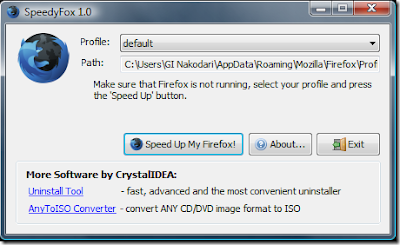
 There’s a great little utility called SpeedyFox which you can use to defrag and compact the SQLITE files. Before running it, make sure you close Firefox first so it can go about its business. It might take a couple of minutes (or up to any hour according to the website) depending on how badly fragmented the SQLITE files are and the speed of your computer. Once done you can fire up Firefox again (or have SpeedyFox do it for you automatically) and see if it has made any difference.

Bear in mind, this utility will only correct performance issues as a result of fragmented SQL files and will do nothing for resource hungry addons or corruption of the browser.There are some way to speed up firefox setting. One of the way using software. One of the software can be used to optimize firefox setting is SpeedyFox. Firefox uses the SQLite database to store settings and other important things (a database for “profile”). SpeedyFox just compact the database. If Database is small  Firefox is faster.
The speedup that occurs after you use SpeedyFox will vary depending on how long you used the specific profile that you intend to speed up Firefox with SpeedyFox.

How to use SpeedyFox

  • Close Firefox.
  • Run SpeedyFox
  • Select the profile you want to speed up
  • Leave profile as “default” if u have not created any new profiles.
  • Click on “Speed Up My Firefox” button to optimize firefox setting
SpeedyFox can be downloaded from the below link:
SpeedyFox for Windows (460 KB)
SpeedyFox for Mac OS X (800 KB) (Universal binary)

 There’s a great little utility called SpeedyFox which you can use to defrag and compact the SQLITE files. Before running it, make sure you close Firefox first so it can go about its business. It might take a couple of minutes (or up to any hour according to the website) depending on how badly fragmented the SQLITE files are and the speed of your computer. Once done you can fire up Firefox again (or have SpeedyFox do it for you automatically) and see if it has made any difference.

Bear in mind, this utility will only correct performance issues as a result of fragmented SQL files and will do nothing for resource hungry addons or corruption of the browser.There are some way to speed up firefox setting. One of the way using software. One of the software can be used to optimize firefox setting is SpeedyFox. Firefox uses the SQLite database to store settings and other important things (a database for “profile”). SpeedyFox just compact the database. If Database is small  Firefox is faster.
The speedup that occurs after you use SpeedyFox will vary depending on how long you used the specific profile that you intend to speed up Firefox with SpeedyFox.

How to use SpeedyFox

  • Close Firefox.
  • Run SpeedyFox
  • Select the profile you want to speed up
  • Leave profile as “default” if u have not created any new profiles.
  • Click on “Speed Up My Firefox” button to optimize firefox setting
SpeedyFox can be downloaded from the below link:
SpeedyFox for Windows (460 KB)
SpeedyFox for Mac OS X (800 KB) (Universal binary)

Add Uninstall Option In Right Click Context Menu

Add Uninstall Option In Right Click Context Menu

Now you can add Uninstall option in your right click menu with
a freeware utility Menu Uninstaller
Using Menu Uninstaller you can uninstall any program with a single right click on its shortcut.It is compatible with windows xp,Vista and windows 7.


How To Add Uninstall Option In Right Click Context Menu:-

  • Download Menu Uninstaller by clicking here
  • Click on the setup to install it in your PC.Installation process is fairly simple (Just Follow Guidelines)
  • Now Uninstall option will available in right click menu.
To remove any program simply right click on its shortcut and select Uninstall Option

Convert Your Torrent Into Direct Link

Convert Your Torrent Into Direct Link


Hi all users, here we're back with another essential tutorial for you. Many of you reported us that torrific.com is no longer available (down) and we want a good alternative for it. So today we're going to introduce a very good alternate of torrific.com, which works with almost any torrent. It offers two kind of services first one is free and second is premium free one if works very well but if you're a die hard downloader  then you have to look for it's premium membership. So lets get started.


How to convert my torrent file into direct link ?
1. First of all you need to download your favorite torrent file from any torrent site. 
2. Now, go to ZbigZ.com.
 
3. Click on upload and Upload the torrent file and click on "go free" button.
4. Wait for caching the torrent File.
 5. Now click on download button.
 6. Now you'll be promoted to choose account type. Click on free.
 
7. Now you've done, a new tab will be opened and your download will be started, have fun!!!

Increase your Utorrent speed by 80%

Increase your Utorrent speed by 80%


Lets get started. If you dont have Utorrent, Download it from here


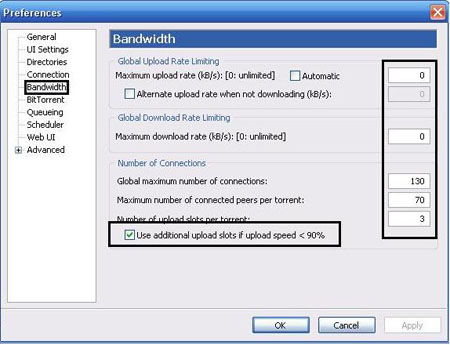
Remember to increase torrent speed please disable firewall before you use it. Now Open it up and follow these screenshots tutorial:


 For connection setting I Here checked enable upnp port mapping, enable NAT-PMP port mapping and i use 45682 for random port.

 Checked use additional upload slots if upload speed <90% and follow the value setting like screenshot.
 Checked for enable dht network, enable dht for new torrent, enable local peer discovery, ask tracker for scrape information, enable peer change, allow incoming legacy connections and enable outgoing protocol encryption.

 Setup net.max_halfopen to 90

 That is it, You have just tweaked the speed of Utorrent by 80%
Remember, If the torrent has no seeds, This will not work!

Bookmark a YouTube video and watch from where you have stopped

Bookmark a YouTube video and watch from where you have stopped

  Would like to bookmark YouTube video at the position which you are watching now? You can easily do that just by following my new trick given below. The best past of this trick is that you don’t need any software for this. And also this trick helps you a lot to avoid some time consuming work.
That’s is ,if you are watching a video and suddenly you got some reason to stop playing that favorite video. In future(next time) you need to play that YouTube video again then seek to that position where you have stopped, really boring. But using my new trick you can just bookmark the current video you are watching at the current time and you can resume it from that point itself, so just follow this easy trick and enjoy.
1)Go to YouTube.com

2)Play the required video
 
3)When it’s time to stop(bookmark) right click on the video player
 
4)Select “copy video url at current time”
 
5)That’s all now a bookmark is saved in your bookmarks with the current playing time(00:00:00)
 
6)In future just click that bookmark and the video will resume playing from where you have stopped.

Free Download Anti-theft Software For Mobile Phones

Free Download Anti-theft Software For Mobile Phones


This Mobile Phone software can be used on any of the following platforms
1.Symbian Platform
2.Windows Platform
3.Android Platform

With the help of this mobile phone software you can
1.Remotely lock your phone by sending sms
2.Remotely format/wipe your phone by sending sms
3.You will get the location and information of the new sim inserted in the phone.
So it can help you recover your mobile phone which has been stolen or lost accidently.

You can download this anti theft mobile phone software from the link given at bottom of this post.


The name of the software is F-secure anti theft system and is developed by a leading company in the field of security.
 In order to lock,wipe or locate your mobile phone you need to send the message in the following format
 Click here to download F-secure anti theft software